

How to Install FastBots on Joomla
Follow these simple steps to install your chatbot on a Joomla website.
How to Get Your FastBots Chatbot Code
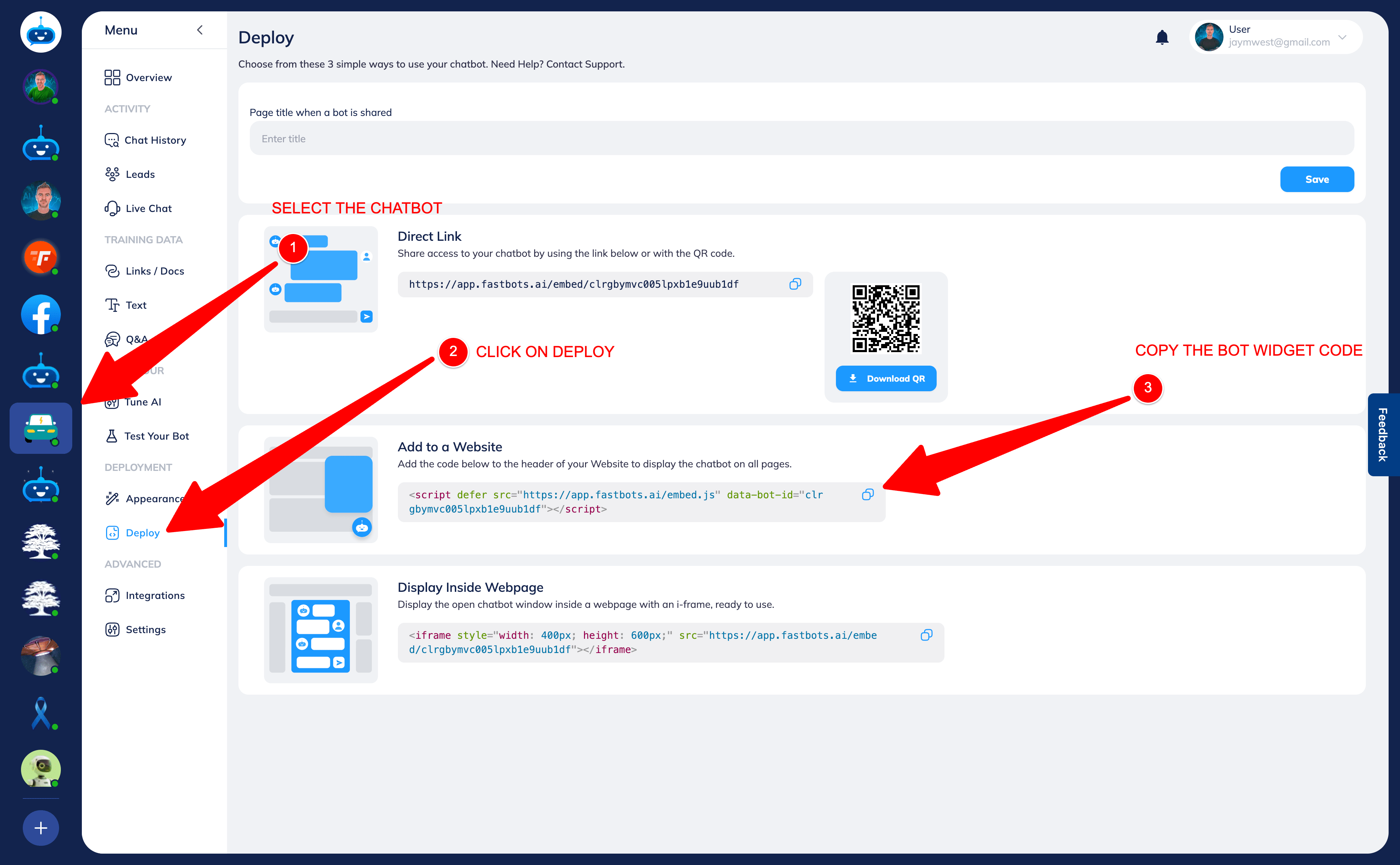
Before installing your chatbot on any platform, you’ll need your widget code.
Log in to FastBots.
Select the chatbot you want to install.
Click Deploy in the left-hand menu.
Scroll to Add to a Website.
Copy the script code using the copy icon.
You’ll paste this code into your website builder so the chatbot appears across all pages.
Step 1 — Add the script to your template
- Log in to Joomla Admin.
- Go to System → Site Templates.
- Open your active template.
- Edit the
index.phpfile. - Paste your FastBots script code just before the closing
</head>tag. - Save and close.
Step 2 — Confirm installation
Refresh your website — the FastBots chatbot should now appear across all pages. Enable and test voice In FastBots, open Deployment → Chat Widget → Conversation Options. Choose Text and Voice or Voice Only, configure your voice settings and select Save Changes. After installation, open your website or shared chatbot link as a visitor. Start a voice conversation, allow microphone access and check that you can hear a reply. If you enabled text fallback, check Type instead too. Voice tests consume message credits. See the Chat Widget and Voice guide for the full setup. The setup wizard still creates a text chatbot; voice is enabled afterwards.